
Einstein Web Recommendations
Working with Einstein Recommendations in Marketing Cloud Engagement.
First published 2020-09-27 in the SFMC Cookbook. Ported here for sfmc.guide.
Official docs: help.salesforce.com/articleView?id=mc_pb_einstein_web_recommendation.htm
To get recommendations, you have to create “pages” that should mirror the views/pages of your website. You can define per page what exactly shall be recommended and also choose between JSON and JavaScript format.
Embedding Web Recommendations
The JSON has to be retrieved via XHR callout and then parsed by your own code to actually create visible output in your HTML. The JavaScript approach requires you to load the JS file like any other JavaScript resource but also include pre-defined HTML code, provided to you by the “Get Code” tab.
Please note that you select the output format when creating a “page” in Einstein on the “ouput” tab. This will define what code is presented on the “Get Code” tab
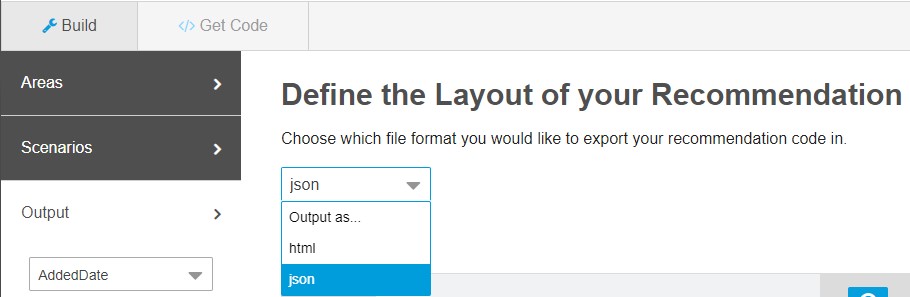
You should define what field values you want in your recommendation via the “Output” tab. Here you can add, remove and order the fields that will be available in your recommendation. Ordering has no impact if you choose to embed via JSON.
How the recommender knows who the current user is
The current user can be identified in 2 ways. The first option uses the cookie set by the Collect Code (collect.js). This might lead to other challenges given the browser initiatives to block third-party cookies (see CORS) and explains what setFirstParty is for. You might have to implement a proxy logic to accomodate this. If no cookie was set, generic recommendations are displayed.
Important: Make sure you run one of the trackXXX methods from collect.js before trying to see personalized recommendations. The setXXX methods alone do not set these cookies.
The second option uses the GET parameter ?email=INSERT_EMAIL_OR_UNIQUE_ID (same you string you used for the Collect Code). Simply attach that to your recommend.js or recommend.json and you are good to go.
Example for JSON:
GET https://INSERT_MID.recs.igodigital.com/a/v2/INSERT_MID/INSERT_PAGE_NAME/recommend.json?category=My%20Shoes&email=joern@foobar.com
Enhancing recommendation results
You can append parameters to the recommend.json / recommend.js as URL parameters to get more focused results. Please make sure you URL-Encode the values! Depending on the page name, these parameters are even shown to you on the “Get Code” tab.
| Page Name | Default GET Parameter |
|---|---|
category |
?category=INSERT_CATEGORY_NAME |
product |
?item=INSERT_SKU |
cart |
?cart=INSERT_SKU1,INSERT_SKU2,INSERT_SKU3,... (separate SKUs with ,) |
search |
?search=INSERT_SEARCH_TERM |
home |
no parameter |
| custom name | no parameter needed but optionally usable |
List of available GET Parameters (docs):
| Get Parameter | Definition |
|---|---|
item |
This unique identifier for your product or content must match the unique key in the catalog and the value sent in the trackPageView collect item variable. This parameter is required to make a product- or content-based recommendation on any page. |
search |
This pipe-delimited list contains search terms from your search page and matches the value sent in the trackPageView collect search variable. Example: search=foo\|bar |
category |
This pipe-delimited list of categories matches both the values sent in the catalog feed and the value sent in the trackPageView collect category variable. Example: search=shoes\|adults\|men |
cart |
This pipe-delimited list of products in the cart matches the trackCart collect item variable. |
wishlist |
This pipe-delimited list of products in the customer’s wishlist must match the trackWishlist collect items variable array. |
email |
Use this parameter for faux-server-side, CloudPages, MobilePush, FaceBook tab, or some mobile apps. Pass the email address of the profile recommendation you want to access. The email value is the same value passed to Collect. If this value is a SubscriberKey, pass the SubscriberKey value. |
user_id |
Not verified: This parameter is used in testing or an advanced setup. It returns the cookie value from the profile containing the recommendations you want to access. |
item_count |
Use this parameter to set the number of returned products or override the returned products setting per area. If you have multiple areas, define the numbers pipe-delimited (exampe of 4 areas: item_count=1\|1\|1\|1 ensures only one item is returned for each) |
locale |
This five-character value (e.g. fr-FR, en-US) indicates which localized content to display. How to set up your Product Catalog for this. |
You may also combine two or more GET parameters (with an & sign, the questionmark is only used up front):
Example for JSON:
GET https://INSERT_MID.recs.igodigital.com/a/v2/INSERT_MID/INSERT_PAGE_NAME/recommend.json?category=My%20Shoes&search=red%20female
Example for HTML/JavaScript:
<!-- Copy this code right before the closing </body> of your INSERT_PAGE_NAME page-->
<script src="https://INSERT_MID.recs.igodigital.com/a/v2/INSERT_MID/INSERT_PAGE_NAME/recommend.js?category=My%20Shoes&search=red%20female"></script>
Embed via JSON
This requires you to do all the styling and processing yourself but also comes with greatest amount of flexibility. Call the below URL to get the JSON for your BU-Page combo:
GET https://INSERT_MID.recs.igodigital.com/a/v2/INSERT_MID/INSERT_PAGE_NAME/recommend.json
Example:
// example for web recommendation on 'product' page with SKU=12345 for BU=67890
GET https://67890.recs.igodigital.com/a/v2/67890/product/recommend.json?item=12345
Handling CORS via JSONP - Cross-Origin-Ressource-Sharing the old way:
If, naturally, you assumed that the JSON would come with proper CORS headers allowing to use this anywhere or that could be configured in some way to be limited to your website then, well, tough luck: It does not and you can’t. Someone even decided it’s a good idea to set x-frame-options: SAMEORIGIN response headers…
However, you can tell the JSON-version of the API to return its payload as a parameter to the callback instead to circumvent the issue. Bit old-fashioned if you ask me but effective.
<script>
// define callback method; ensure it is defined in the GLOBAL scope!
window.myJsFunctionName = function(json) {
    // parse JSON response with your code here
}
</script>
Now, load the JavasScript-ified JSON. One way is to simply use another script tag:
<script src="https://INSERT_MID.recs.igodigital.com/a/v2/INSERT_MID/INSERT_PAGE_NAME/recommend.json?callback=myJsFunctionName"></script>
If your framework has a good wrapper for JSONP then feel free to use that instead of static script-nodes like shown below. The following example uses jQuery:
$.ajax({
    type: 'GET',
    url: 'https://INSERT_MID.recs.igodigital.com/a/v2/INSERT_MID/INSERT_PAGE_NAME/recommend.json',
    dataType: 'jsonp',
    jsonpCallback: 'myJsFunctionName',
    crossDomain: true
});
Either way, the content of recommend.json will be transformed to something like the following:
// the content of recommend.json will turn into javascript
myJsFunctionName([{"name": "igdrec_1","empty": true}]);
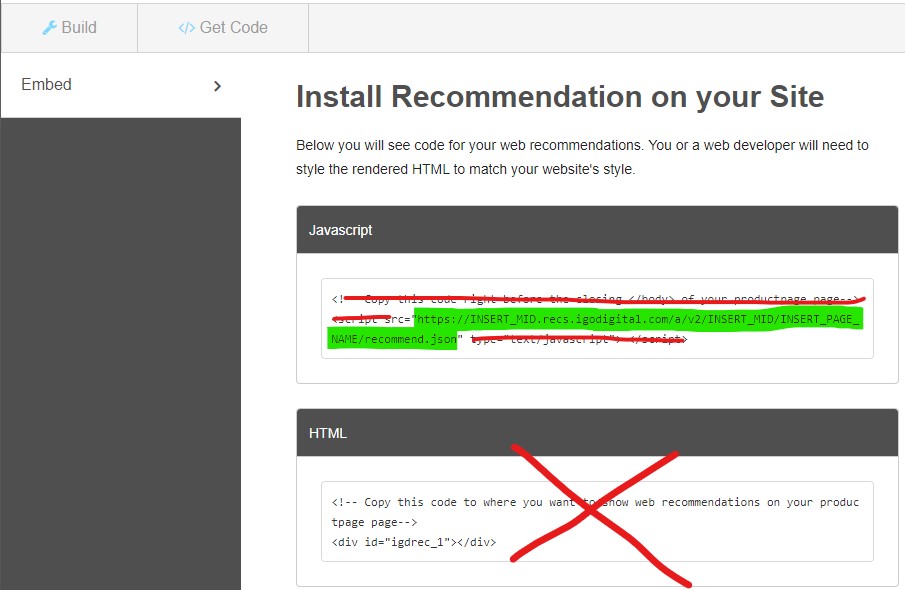
Important: The Web Recommendations’ “Get Code” tab was apparently only written with the “html” / JavaScript embed code in mind and falsely asks you to load the JSON via script-tag. It then continues to also ask you to include certain HTML. You need to ignore that and simply copy the url out of that snippet instead!
The URL per page (without parameter value) is provided on the “Get Code” tab, however that page is misleading in other ways:
JSON Example responses
The following assumes only one recommendation area was defined and the default name “igdrec_1” was kept. Furthermore, the list of included fields was defined as “ProductLink”, “ImageLink”, “ProductName”, “RegularPrice”.
As long as recommendations are not ready, the API will return ab empty:true attribute per defined recommendation area:
// no recommendation available yet
[
    {
        "name": "igdrec_1",
        "empty": true
    }
]
The reponse will look something like this once recommendations are actually available. Note that you define the area-name (e.g. by default “igdreg_x”) and the number of items on the “Areas” tab. What scenarios are displayed first (if possible based on available data) is defined on the “Scenario” tab. If one or more scenarios are not possible to use yet, the system skips to the next one in your order or even falls back to “System Scenarios” (unless you specifically disabled that checkbox for the current page). Finally, the item-attributes (e.g. link, regular_price, …) are defined for all areas of a page at once on the “Output” tab.
// (some) recommendation returned for a page with 3 defined areas

[ // list of areas, corresponding to scenario ordering
    {
        "name": "igdrec_1", // Name of Area #1
        "title": "Popular Items Today", // title of 1st available scenario
        "priority": 1,
        "items": [
            {
                "link": "Link",
                "image_link": "Image link",
                "name": "Name",
                "regular_price": 112.0
            },
            {
                "link": "Link",
                "image_link": "Image link",
                "name": "Name",
                "regular_price": 412.0
            }
        ]
    },
    {
        "name": "igdrec_2", // Name of Area #2
        "title": "Most Viewed Items", // title of 2nd available scenario
        "priority": 2,
        "items": [
            {
                "link": "Link",
                "image_link": "Image link",
                "name": "Name",
                "regular_price": 212.0
            },
            {
                "link": "Link",
                "image_link": "Image link",
                "name": "Name",
                "regular_price": 312.0
            }
        ]
    },
    {
        "name": "igdrec_3", // Name of Area #3
        "empty": true // no further recommendation available yet
    }
]
Embed via JavaScript (“HTML”)
You will be asked to load a JavaScript file like this:
<!-- Copy this code right before the closing </body> of your INSERT_PAGE_NAME page-->
<script src='https://INSERT_MID.recs.igodigital.com/a/v2/INSERT_MID/INSERT_PAGE_NAME/recommend.js'></script>
As well as position some HTML where you want the final recommendation to be inserted like this:
<!-- Copy this code to where you want to show web recommendations on your INSERT_PAGE_NAME page-->
<div id='igdrec_1'></div>
This second part will vary depending on your choices made on the “Build”>”Areas” tab.
JavaScript/HTML example code
As long as recommendations are not ready the code of recommend.js will be missing the crucial part that actually fills in the recommendation.
// recommend.js if recommendations are not ready yet and only one area named "idgrec_1" was defined for this page

function display_INSERT_PAGE_NAME(zone, id) {
    if (id === 'igdrec_1') {
          zone.innerHTML = '';
    }
}

function addLoadEvent(func) {
    var oldonload = window.onload;
    if (typeof window.onload != 'function') {
        window.onload = func;
    } else {
        window.onload = function() {
            if (oldonload) {
                oldonload();
            }
            func();
        }
    }
}

function callREC() {
    var pageZone = document.getElementById('igdrec_1');
    if ( undefined != pageZone) {
        display_INSERT_PAGE_NAME(pageZone, 'igdrec_1');
    }
}

callREC();
Note: the method display_INSERT_PAGE_NAME() will be named according to your page: If you named the page “MyTest” the method will be named display_MyTest().
If you defined more than one recommendation area, the code will be auto-extended to match that:
// recommend.js if recommendations are not ready yet and two areas named "idgrec_1" and "idgrec_2" were defined for this page

function display_INSERT_PAGE_NAME(zone, id) {
    if (id === 'igdrec_1') {
        zone.innerHTML = '';
    }
    if (id === 'igdrec_2') {
        zone.innerHTML = '';
    }
}

function addLoadEvent(func) {
    var oldonload = window.onload;
    if (typeof window.onload != 'function') {
        window.onload = func;
    } else {
        window.onload = function() {
            if (oldonload) {
                oldonload();
            }
            func();
        }
    }
}

function callREC() {
    var pageZone = document.getElementById('igdrec_1');
    if ( undefined != pageZone) {
        display_INSERT_PAGE_NAME(pageZone, 'igdrec_1');
    }
    var pageZone = document.getElementById('igdrec_2');
    if ( undefined != pageZone) {
        display_INSERT_PAGE_NAME(pageZone, 'igdrec_2');
    }
}

callREC();
The reponse will look something like this once recommendations are actually available. The only difference is that the zone.innerHTML-line now gets the actual HTML set, pre-rendered on the server without further callouts:
// recommend.js if recommendations are finally ready and only one area named "idgrec_1" was defined for this page with 2 items returned

function display_INSERT_PAGE_NAME(zone, id) {
    if (id === 'igdrec_1') {
        // NOTE: main difference is that zone.innerHTML actually gets a value
        zone.innerHTML = "  <div class='igo_boxhead'><h2>Most Viewed Items</h2></div>  <div class='igo_boxbody'><div class='igo_product'><a href='https://INSERT_MID.collect.igodigital.com/redirect/v3Q_SOME_BASE64_ENCODED_AND_ENRRYPTED_STRING_HERE_ZGYyNw=='>banana</a><a href='https://INSERT_MID.collect.igodigital.com/redirect/v3Qk_SOME_BASE64_ENCODED_AND_ENRRYPTED_STRING_HERE_ZGYyNw=='><img class='igo_product_image' src='https://your.own.image-server.com/2332264' /></a><div class='igo_product_product_name'><span class='igo_product_product_name_label'>Product Name:</span><span class='igo_product_product_name_value'>banana</span></div><div class='igo_product_regular_price'><span class='igo_product_regular_price_label'></span><span class='igo_product_regular_price_value'>$12.30</span></div></div><div class='igo_product last_rec'><a href='https://INSERT_MID.collect.igodigital.com/redirect/v3Q_SOME_BASE64_ENCODED_AND_ENRRYPTED_STRING_HERE_iYjNhOQ=='>banana</a><a href='https://INSERT_MID.collect.igodigital.com/redirect/v3Q_SOME_BASE64_ENCODED_AND_ENRRYPTED_STRING_HERE_iYjNhOQ=='><img class='igo_product_image' src='https://your.own.image-server.com/2324009' /></a><div class='igo_product_product_name'><span class='igo_product_product_name_label'>Product Name:</span><span class='igo_product_product_name_value'>banana</span></div><div class='igo_product_regular_price'><span class='igo_product_regular_price_label'></span><span class='igo_product_regular_price_value'>$12.30</span></div></div>  </div>";
    }
}

function addLoadEvent(func) {
    var oldonload = window.onload;
    if (typeof window.onload != 'function') {
        window.onload = func;
    } else {
        window.onload = function() {
            if (oldonload) {
                oldonload();
            }
            func();
        }
    }
}

function callREC() {
    var pageZone = document.getElementById('igdrec_1');
    if ( undefined != pageZone) {
        display_INSERT_PAGE_NAME(pageZone, 'igdrec_1');
    }
}

callREC();
The HTML that will be created for you will look something like the following:
<div class="igo_boxhead"><h2>Most Viewed Items</h2></div>
<div class="igo_boxbody">
    <div class="igo_product">
        <a
            href="https://INSERT_MID.collect.igodigital.com/redirect/v3Q_SOME_BASE64_ENCODED_AND_ENRRYPTED_STRING_HERE_ZGYyNw=="
            >banana</a
        ><a
            href="https://INSERT_MID.collect.igodigital.com/redirect/v3Qk_SOME_BASE64_ENCODED_AND_ENRRYPTED_STRING_HERE_ZGYyNw=="
            ><img class="igo_product_image" src="https://your.own.image-server.com/2332264"
        /></a>
        <div class="igo_product_product_name">
            <span class="igo_product_product_name_label">Product Name:</span
            ><span class="igo_product_product_name_value">banana</span>
        </div>
        <div class="igo_product_regular_price">
            <span class="igo_product_regular_price_label"></span
            ><span class="igo_product_regular_price_value">$12.30</span>
        </div>
    </div>
    <div class="igo_product last_rec">
        <a
            href="https://INSERT_MID.collect.igodigital.com/redirect/v3Q_SOME_BASE64_ENCODED_AND_ENRRYPTED_STRING_HERE_iYjNhOQ=="
            >banana</a
        ><a
            href="https://INSERT_MID.collect.igodigital.com/redirect/v3Q_SOME_BASE64_ENCODED_AND_ENRRYPTED_STRING_HERE_iYjNhOQ=="
            ><img class="igo_product_image" src="https://your.own.image-server.com/2324009"
        /></a>
        <div class="igo_product_product_name">
            <span class="igo_product_product_name_label">Product Name:</span
            ><span class="igo_product_product_name_value">banana</span>
        </div>
        <div class="igo_product_regular_price">
            <span class="igo_product_regular_price_label"></span
            ><span class="igo_product_regular_price_value">$12.30</span>
        </div>
    </div>
</div>
Debugging Web Recommendations
Once you have created a page and start seeing recommendations come in you might wonder why things are displayed the way they are. An easy way to dig deeper is to the recommend.js or recommend.json URL that the Get Code tab shows you and change the ending to recommend.explain. That shows you a whole lot more output all the sudden and lets you analyze whats happening.
Example call:
GET https://INSERT_MID.recs.igodigital.com/a/v2/INSERT_MID/INSERT_PAGE_NAME/recommend.explain
Example response:
{
    "scenarios": [
        {
            "name": "topenjoyed",
            "code": "Home_TopEnjoyed",
            "score": 990,
            "getmores": 1,
            "for_target": "OurMostBoughtProducts",
            "items": [
                "ABC-93710600001",
                "ABC-86594971",
                "ABC-94212000003"
            ],
            "filters": [],
            "status": "returned"
        },
        {
            "name": "topenjoyed",
            "code": "Home_TopEnjoyed",
            "score": 900,
            "getmores": 1,
            "for_target": "InSeason",
            "items": ["ABC-87847461", "ABC-87843491", "ABC-87847471"],
            "filters": [],
            "status": "returned"
        },
        {
            "name": "topenjoyed",
            "code": "Home_TopEnjoyed",
            "score": 800,
            "getmores": 1,
            "for_target": "NewProducts",
            "items": [
                "ABC-19025001",
                "ABC-87906121",
                "ABC-24690301"
            ],
            "filters": [],
            "status": "returned"
        },
        {
            "name": "topenjoyed",
            "code": "Home_TopEnjoyed",
            "score": 700,
            "getmores": 2,
            "for_target": "MostRelevantPromotedProducts",
            "items": [
                "ABC-35926501",
                "ABC-30965601",
                "ABC-22645201"
            ],
            "filters": [],
            "status": "returned"
        },
        {
            "name": "topsellers",
            "code": "Home_MostPopular",
            "score": 1000,
            "getmores": 2,
            "for_target": "OurMostBoughtProducts",
            "items": [],
            "filters": [],
            "status": "rejected"
        },
        {
            "name": "topsellers",
            "code": "Home_MostPopular",
            "score": 920,
            "getmores": 2,
            "for_target": "InSeason",
            "items": [],
            "filters": [],
            "status": "rejected"
        },
        {
            "name": "topviews",
            "code": "Home_MostViewed",
            "score": 910,
            "getmores": 2,
            "for_target": "InSeason",
            "items": [
                "ABC-89673861",
                "ABC-88148871",
                "ABC-99403401050"
            ],
            "filters": [],
            "status": "rejected"
        },
        {
            "name": "topsellers",
            "code": "Home_MostPopular",
            "score": 820,
            "getmores": 2,
            "for_target": "NewProducts",
            "items": [],
            "filters": [],
            "status": "rejected"
        },
        {
            "name": "topviews",
            "code": "Home_MostViewed",
            "score": 810,
            "getmores": 2,
            "for_target": "NewProducts",
            "items": [
                "ABC-89673861",
                "ABC-88148871",
                "ABC-99403401050"
            ],
            "filters": [],
            "status": "rejected"
        },
        {
            "name": "topsellers",
            "code": "Home_MostPopular",
            "score": 720,
            "getmores": 2,
            "for_target": "MostRelevantPromotedProducts",
            "items": [],
            "filters": [],
            "status": "rejected"
        },
        {
            "name": "topviews",
            "code": "Home_MostViewed",
            "score": 710,
            "getmores": 2,
            "for_target": "MostRelevantPromotedProducts",
            "items": [
                "ABC-89673861",
                "ABC-88148871",
                "ABC-99403401050"
            ],
            "filters": [],
            "status": "rejected"
        },
        {
            "name": "topgrossing",
            "code": "Home_TopGrossing",
            "score": 1,
            "getmores": 0,
            "for_target": null,
            "items": null,
            "filters": [],
            "status": "available"
        },
        {
            "name": "topviews",
            "code": "Home_MostViewed",
            "score": 1,
            "getmores": 0,
            "for_target": null,
            "items": null,
            "filters": [],
            "status": "available"
        },
        {
            "name": "topsellers",
            "code": "Home_MostPopular",
            "score": 1,
            "getmores": 0,
            "for_target": null,
            "items": null,
            "filters": [],
            "status": "available"
        }
    ],
    "filters": [
        {
            "type": "emphasize_tags",
            "params": [{}],
            "block_given?": false,
            "priority": 0,
            "waslocal": true,
            "excluded_skus": null
        },
        {
            "type": "exclude",
            "params": [{ "ct": ["asset", "content", "banner"] }],
            "block_given?": false,
            "priority": 0,
            "waslocal": true,
            "excluded_skus": []
        }
    ],
    "divs": [
        { "size": "1..16", "target": "OurMostBoughtProducts" },
        {
            "size": "1..16",
            "target": "InSeason",
            "filters": [
                {
                    "type": "include",
                    "params": [{ "st": "Christmas" }, null],
                    "block_given?": false,
                    "priority": 0,
                    "waslocal": true,
                    "excluded_skus": [
                        "ABC-94212300001",
                        "ABC-46054901",
                        "ABC-32529101",
                        "ABC-87906081",
                        "ABC-54878201"
                    ]
                }
            ]
        },
        {
            "size": "1..16",
            "target": "NewProducts",
            "filters": [
                {
                    "type": "include",
                    "params": [{ "ne": "Y" }, null],
                    "block_given?": false,
                    "priority": 0,
                    "waslocal": true,
                    "excluded_skus": [
                        "ABC-89673861",
                        "ABC-88148871",
                        "ABC-99403401050",
                        "ABC-87879261",
                        "ABC-87842451"
                    ]
                }
            ]
        },
        {
            "size": "1..16",
            "target": "MostRelevantPromotedProducts",
            "filters": [
                {
                    "type": "include",
                    "params": [{ "ioo": "Y" }, null],
                    "block_given?": false,
                    "priority": 0,
                    "waslocal": true,
                    "excluded_skus": [
                        "ABC-87842441",
                        "ABC-87884171",
                        "ABC-93710500001",
                        "ABC-87905821",
                        "ABC-87842491",
                        "ABC-87842451"
                    ]
                }
            ]
        }
    ],
    "errors": [],
    "weights": {},
    "page": "general",
    "referer": null
}